
You will need to associate the Dive Plan with a Dive Project. Select one of the program-wide Dive Projects – either the “Research dives” or the “Proficiency and Training Dives” (refer to the instructions for “Dive Project” if you need additional info). Note that you will not be able to add an Area or Location during the process of adding a Dive Plan. If you need to add an Area or Location, refer to the instructions for “Adding an Area or Location”.
To create a Dive Plan, complete the following steps.
- Select “Diving” from the left side menu.
- Expand the selection and choose “Dive Plans”.
- Select “+Dive Plan” at the top middle of the page.
- Select one of the program-wide Dive Projects – either the “Research dives” or the “Proficiency and Training Dives”.

- Populate all fields and tabs (Mandatory fields, Divers, Plans).
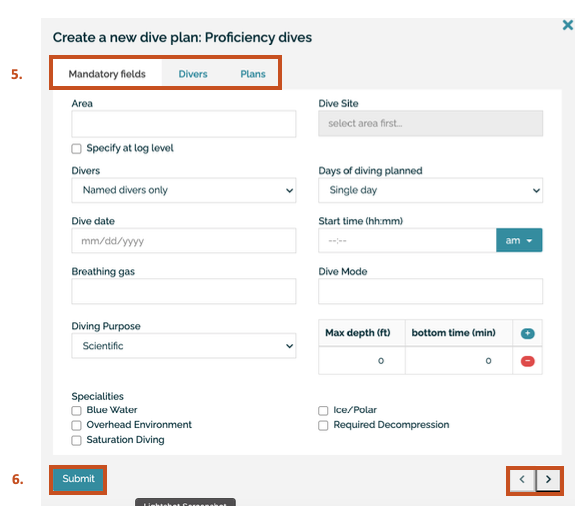
- Submit the dive plan when you are ready to do so.