Home » Office for Research Protections » Institutional Biosafety Committee (IBC) » IBC Events, Training & Resources » CATS Safety Guidance
IBC Menu
ORP Menu
- Office for Research Protections (ORP) Home Page
- Conflict of Interest
- Controlled Substances
- Drone Operations
- Dual Use Research of Concern (IRE)
- Education
- Export Control
- Human Stem Cells (ESCRO)
- Human Subjects Research (IRB)
- Radioisotopes (UIC)
- Institutional Biosafety Committee (IBC)
- Research Data Management Policy
- Research Integrity
- Research Security
- Scientific Diving
- Vertebrate Animal Care and Use (IACUC)
- Quality Assurance
- ORP Team
- ORP Events
- ORP Announcements
- Office for Research Protections (ORP) Home Page
- Conflict of Interest
- Controlled Substances
- Drone Operations
- Dual Use Research of Concern (IRE)
- Education
- Export Control
- Human Stem Cells (ESCRO)
- Human Subjects Research (IRB)
- Radioisotopes (UIC)
- Institutional Biosafety Committee (IBC)
- Research Data Management Policy
- Research Integrity
- Research Security
- Scientific Diving
- Vertebrate Animal Care and Use (IACUC)
- Quality Assurance
- ORP Team
- ORP Events
- ORP Announcements
CATS Safety Guidance
This webpage provides guidance on the use of CATS (Centralized Application Tracking System) Safety for submitting and managing biosafety and radiation safety protocols. This page is intended to be used as a quick reference; for more detailed instructions on the CATS Safety system, refer to the Researcher’s Guide.
Which type of submission do you need to complete?
New Safety Submission
Purpose: To submit a biosafety protocol or radiation safety protocol.
Biosafety:
- Applicable to Biosafety researchers at all campuses
- University Park and the Commonwealth Campuses: Refer to the Biosafety Protocol Tips document for guidance
Radiation Safety:
- College of Medicine: Applicable to all radioisotope researchers
- University Park and the Commonwealth Campuses: Applicable to any radioisotope researcher without an existing UIC authorization
- Refer to the Radiation Safety Protocol Tips document for guidance
How to Create and Submit a New Submission
- Log into CATS Safety: https://researchsafety.psu.edu
- In My Inbox, on the left menu, select Create > Create Safety Submission

- Work through the SmartForm, completing all the pages; see the Protocol Tips documents for guidance on specific SmartForm sections. Select the Continue button (on bottom right) to complete each page of the Safety submission. The left navigation bar can also be used to navigate around the Safety submission and is available after creating the first page of the submission.
- Select the Save & Exit button on the Supporting Documents page to finish the SmartForm.
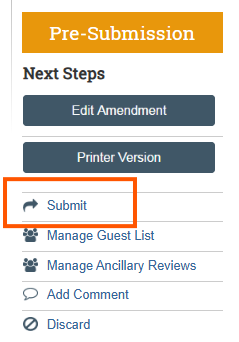
- Select the Submit button on left sidebar “Next Steps” menu. Important: Only a Principal Investigator (PI) or PI proxy can submit.
Submission States:
- Pre-Submission: this state indicates that the submission has not yet been submitted for review
- Safety Specialist: this state indicates that the submission has been submitted for review. When the submission is in this state, the submission cannot be edited by the PI or protocol team members.
- If you do not have time to complete the online Safety submission, you can return to the form anytime (if the first page of the safety submission was saved). Return to the form by clicking on the protocol name from the Dashboard.
User Roles:
- The creator of the Safety submission does not need to be the PI but must be a protocol team member on the safety submission
- PI Proxy:
- From the main protocol page, the PI can assign a PI Proxy. The PI Proxy can submit the protocol on behalf of the PI
- To assign a PI Proxy, add the person on the “Protocol Team Members” page and then navigate to the main protocol page and then click the “Assign PI Proxy” button
- All protocol team members can create, view, and edit the Safety submission
Amendment
Purpose: To submit a change to an approved protocol.
Biosafety:
- Applicable to Biosafety researchers at all campuses
Radiation Safety:
- College of Medicine: Applicable to all radioisotope researchers with an approved protocol in CATS Safety
- University Park and the Commonwealth Campuses: Applicable to radioisotope researchers with an existing UIC authorization in CATS Safety
How to Submit an Amendment
- Log into CATS Safety: https://researchsafety.psu.edu
- From the left-hand menu, click Submissions.

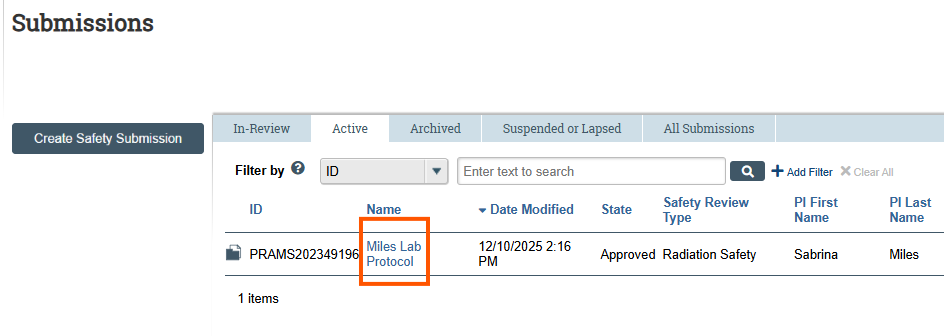
- In the Submissions workspace, select the Active tab.
- Review the list and click the Name of the protocol associated with the PI who needs to create an Amendment.
- From the left-hand menu under Next Steps, click Create Amendment/CR.
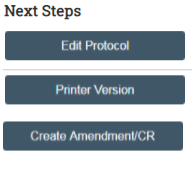
- On the Amendment/Continuing Review page, select Amendment as the Type of Submission, then click Continue.
- Answer all required questions on the Amendment Introduction page and click Continue to move forward.
- Review and update each page of the protocol.
- On the final page (Supporting Documents), click Save & Exit.
- Note: The submission is not yet submitted for review. The PI must click the Submit activity from the protocol workspace to forward the submission for review.
Annual Continuing Review (CR)
Purpose: To request a one-year extension to an approved protocol with the opportunity to report accidents and problems.
Biosafety:
- College of Medicine: Not applicable
- University Park and the Commonwealth Campuses: Applicable to all biosafety researchers
Radiation Safety:
- Not currently applicable to researchers at any campus
How to Submit a Continuing Review
- Log into CATS Safety: https://researchsafety.psu.edu
- From the left-hand menu, click Submissions.

- In the Submissions workspace, select the Active tab.
- Review the list and click the Name of the protocol associated with the PI who needs to create an Amendment.
- From the left-hand menu under Next Steps, click Create Amendment/CR.

- On the Amendment/Continuing Review page, select Continuing Review as the Type of Submission, then click Continue.
- Answer all required questions on the Continuing Review Introduction page and click Continue to move forward.
- Review and complete each page of the Continuing Review and click Continue to move forward.
- On the final page, click Save & Exit.
- Note: The submission is not yet submitted for review. The PI must click the Submit activity from the protocol workspace to forward the submission for review.

Amendment and Annual Continuing Review (Amendment/CR)
Purpose: To request changes to an approved protocol while also requesting the extension of an approved protocol one year. Amendment/CR can only be submitted if there is no existing open CR and/or an existing amendment. The submission follows the same review process as the original protocol submission.
Biosafety:
- College of Medicine: Not applicable
- University Park and the Commonwealth Campuses: Applicable to all biosafety researchers
Radiation Safety:
- Not currently applicable to researchers at any campus
How to Submit an Amendment/CR
- Log into CATS Safety: https://researchsafety.psu.edu
- From the left-hand menu, click Submissions.

- In the Submissions workspace, select the Active tab.
- Review the list and click the Name of the protocol associated with the PI who needs to create an Amendment.
- From the left-hand menu under Next Steps, click Create Amendment/CR.

- On the Amendment/Continuing Review page, select Amendment/CR as the Type of Submission, then click Continue.
- Answer all required questions related to the Annual Continuing Review and Amendment. Click Continue to move forward.
- Review and update each page of the protocol.
- On the final page (Supporting Documents), click Save & Exit.
- Note: The submission is not yet submitted for review. The PI must click the Submit activity from the protocol workspace to forward the submission for review.

Three-Year Renewal (De Novo Renewal)
Purpose: Protocols require full resubmission every three years through a De Novo submission. A De Novo submission can be created and submitted if there are no active follow-on submissions (i.e., Amendment, Continuing Review, or Amendment/Continuing Review) in process. Once the De Novo submission is approved, the expiring protocol moves to closed and the De Novo submission becomes the approved active protocol.
Biosafety:
- Applicable to Biosafety researchers at all campuses
Radiation Safety:
- College of Medicine: Not currently applicable
- University Park and the Commonwealth Campuses: Applicable to radioisotope researchers with an existing UIC authorization
How to Submit a De Novo Renewal
- Log into CATS Safety: https://researchsafety.psu.edu
- From the left-hand menu, click Submissions.

- In the Submissions workspace, select the Active tab.
- Review the list and click the Name of the protocol associated with the PI who needs to create a De Novo submission.
- From the left-hand menu under Next Steps, click Create De Novo Submission.

- A confirmation window will appear. Select Yes and click OK to proceed.
- CATS Safety will begin creating the submission. On the History tab of the protocol, you will see a prompt to refresh the browser. Continue refreshing until the De Novo submission is created.
- Once created, a hyperlink to the De Novo submission will appear on the History tab. The new submission ID will match the original protocol ID with the prefix DN1 (indicating the first De Novo submission).

- Click the hyperlink to access the new submission.
- Click Edit Protocol to begin updating the submission.
- Review and complete each page of the protocol, clicking Continue to move forward.
- On the final page (Supporting Documents), click Save & Exit.
- Note: The submission is not yet submitted for review. The PI must click the Submit activity from the protocol workspace to forward the submission for review.

Protocol Closure
Purpose: This action serves as the official mechanism for communicating the intent to terminate an approved research protocol and requires submission of a clear justification for the closure.
Biosafety:
- Applicable to Biosafety researchers at all campuses
Radiation Safety:
- Applicable to radioisotope users at all campuses
How to Initiate Protocol Closure
- Log into CATS Safety: https://researchsafety.psu.edu
- From the left-hand menu, click Submissions.

- In the Submissions workspace, select the Active tab.
- Review the list and click the Name of the protocol associated with the PI who needs to create a request to close a protocol.
- From the left-hand menu under Next Steps, click Request Closure.
- Provide a response to each of the questions and click OK to submit.
Transitioning Active UIC Authorizations into CATS Safety
University Park and Commonwealth Campuses: Principal Investigators transitioning their radiation safety research into CATS Safety can find additional instructions on completing the transition of active UIC authorizations into CATS Safety.
Additional Guidance
General Tips
- CATS Safety uses a SmartForm that guides you through your submission. It is HIGHLY recommended to proceed page by page through the SmartForm.
- Red asterisks (*) indicate questions that require a response
- Help Text: Blue question mark bubbles throughout the system provide further guidance on how to interpret a page or answer a question.
- Required Training: All personnel will need to complete required trainings as outlined in the protocol submission.
- Learn more about required biosafety training and access detailed CITI instructions.
- Learn more about required radiation safety training.
Assign PI Proxy
- A PI Proxy can submit a protocol, submit clarifications requested, submitting responses, and submitting follow-on submissions (Amendment, Amendment/CR, Continuing Review, De Novo) on behalf of the PI.
- Learn more about Assigning, Updating or Removing a Principal Investigator (PI) Proxy Role.
Assign Primary Contact
- The Primary Contact is assigned at the protocol level.
- The Primary Contact can view the protocol and related submissions, but cannot edit.
- The Primary Contact does not need to be listed as a protocol team member on the protocol.
- All protocol-related notifications sent to the Principal Investigator and PI Proxy(ies) will also be sent to the Primary Contact.
How to Assign the Primary Contact
- Log into CATS Safety: https://researchsafety.psu.edu and navigate to the protocol workspace.
- Under Next Steps, select Assign Primary Contact.

- Select the Primary Contact and click OK.
Searching the System
- A wildcard is a search technique used to improve search results in a database. The wildcard search is important because it will return all relevant results (not just those beginning with your word). It searches the whole string of text.
- When searching within the system, click on the three dots to the right of the text box to see a complete list of options. You can use the percent symbol (%) as a wildcard to help direct your search.
- Begin typing in the text box to search for items; results will appear based on the letters you type. As you type in the text box, the results will narrow in the selection listing.
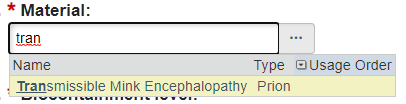
- If you want to broaden your search to look for items containing the letters you have typed, use the percent sign (%) as a wildcard to show all items containing certain letters.
- Example: Type “sm%” to see all words beginning with sm; type “%sm” to see all entries containing the letter sequence “sm.”
- Facility search: When searching for a room/facility, use the % before the room number (e.g., %250). If the room is only 1 to 2 numbers, add “0” in the beginning to create a three-digit number (“%025” or “%002”).
Completing Personnel Experience Information
- The research compliance committees (e.g., IBC, UIC, IRE) review the Principal Investigator (PI) and Protocol Team Members’ experience to ensure each individual has the necessary training and experience to complete their assigned research activities.
- All protocol team members (including the PI) must add their own research experience in their My Profile. See detailed instructions for updating personnel information.
- Important Tip: Use terminology like “experience since 2015” or “5+ years of experience” instead of “for the last 2 years.” This will help with maintaining up-to-date experience descriptions. If no experience, indicate “No experience but will be trained by…”
- Personnel experience will populate on the Training and Experience Summary page in the Safety submission immediately following the update to My Profile.
Responding to Clarification Requests
- Once a protocol has been created and submitted to a research compliance committee (e.g., IBC, UIC, IRE), the staff or committee reviewing the protocol may have additional clarifications or required modifications.
- As a result, research staff may need to respond to questions and/or make changes to their protocol.
- Learn more about how to Respond to Clarification Requests.
Resources Available To Assist
Zoom Training
- CATS Safety submission training via Zoom is available. Find dates and register here.
CATS Safety Help Center
- Log into CATS Safety: https://researchsafety.psu.edu
- In the top navigation bar, select Safety then Help Center
- Click on the middle menu to access various resources (note that there are separate tabs for Biosafety and Radiation Safety resources):
- Program and Policy (e.g., Penn State Policy RP11, Federal Policies, etc.)
- Researcher Resources (e.g., reference documents and guides)
- Safety Researcher’s Guide: This document provides quick steps for PIs and research teams for creating and submitting protocols and follow-on submissions
- Safety Submission Form Design Document: A guide that contains all of the protocol questions presented in CATS Safety
- Support and Contacts: Contact Information for content help and system help
CATS Safety Library
The Library houses Standard Operating Procedures (SOPs) and other researcher facing documentation which may be necessary for the completion of Safety protocols. To access the CATS Safety Library:
- Log into CATS Safety: https://researchsafety.psu.edu
- In the top navigation bar, select Safety then Library
- Click on the middle menu to access resources (note that there are separate tabs for Biosafety and Radiation Safety resources):
- Penn State Health and College of Medicine
- University Park and All Other Campuses and Locations
College of Medicine and Penn State Health affiliates should use the Log in to Penn State Systems webpage for step-by-step instructions on logging in to CATS Safety.