
How to transition active UIC authorizations via Amendment
- Log in to CATS Safety
Go to https://researchsafety.psu.edu. - Access Submissions
From the left-hand menu, click Submissions.
- Locate Active Protocols
In the Submissions workspace, select the Active tab. - Select the Protocol
Review the list and click the Name of the protocol associated with the PI who needs to create an Amendment.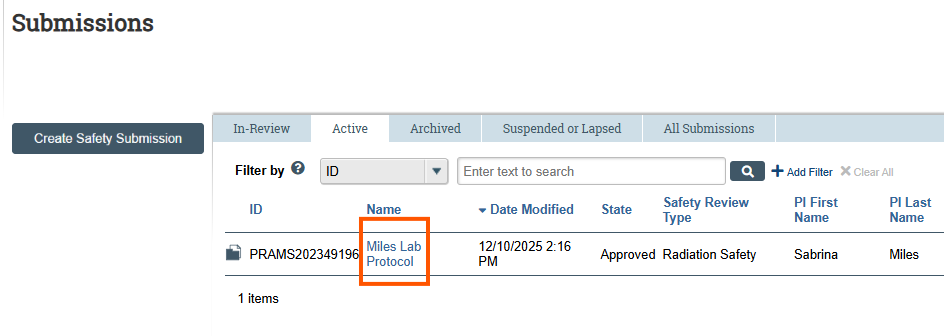
- Accessing Currently Approved Authorizations
In the protocol workspace, go to the Documents tab. Under Protocol documents are currently approved UIC authorizations for this protocol. Refer to these documents if/as needed to complete the CATS Safety submission.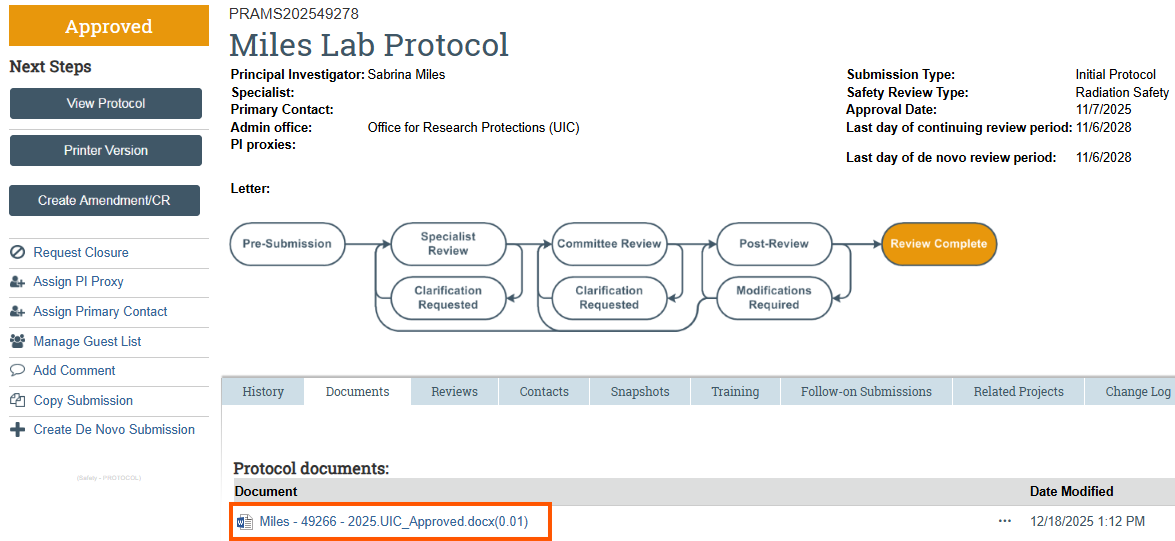
- Create Amendment
From the left-hand menu under Next Steps, click Create Amendment/CR. - Choose Submission Type
On the Amendment/Continuing Review page, select Amendment as the Type of Submission, then click Continue. - Complete Amendment Introduction
Answer all required questions on the Amendment Introduction page and click Continue.
Refer to Radiation Safety Protocol Tips document for guidance. - Update Protocol Details
Review and complete each page of the protocol, clicking Continue to move forward. - Save & Exit
On the final page (Supporting Documents), click Save & Exit. - Submit for Review
Note: The submission is not yet submitted for review. The PI must click the Submit activity from the protocol workspace to forward the submission for review.
How to transition active UIC authorizations via De Novo Submission
- Log in to CATS Safety
Go to https://researchsafety.psu.edu. - Access Submissions
From the left-hand menu, click Submissions. - Locate Active Protocols
In the Submissions workspace, select the Active tab. - Select the Protocol
Review the list and click the Name of the protocol associated with the PI who needs to create a De Novo submission. - Accessing Currently Approved Authorizations
In the protocol workspace, go to the Documents tab. Under Protocol documents are currently approved UIC authorizations for this protocol. Refer to these documents if/as needed to complete the CATS Safety submission. - Create De Novo Submission
From the left-hand menu under Next Steps, click Create De Novo Submission.
- Confirm Creation
A confirmation window will appear. Select Yes and click OK to proceed. - Monitor Creation Process
CATS Safety will begin creating the submission. On the History tab of the protocol, you will see a prompt to refresh the browser. Continue refreshing until the De Novo submission is created. - Locate the New Submission
Once created, a hyperlink to the De Novo submission will appear on the History tab. The new submission ID will match the original protocol ID with the prefix DN1 (indicating the first De Novo submission).
- Open the De Novo Submission
Click the hyperlink to access the new submission. - Edit Protocol
Click Edit Protocol to begin updating the submission.
- Complete Protocol Pages
Review and complete each page of the protocol, clicking Continue to move forward. - Save & Exit
On the final page (Supporting Documents), click Save & Exit. - Submit for Review
Note: The submission is not yet submitted for review. The PI must click the Submit activity from the protocol workspace to forward the submission for review.