Log a Dive

Instructions to log a dive in Bloop

Please note that it is not possible to change the selected dive plan after logging a dive.

  1. Select “Diving” from the left side menu.
  2. Expand the selection and choose “My Dive Logs”.
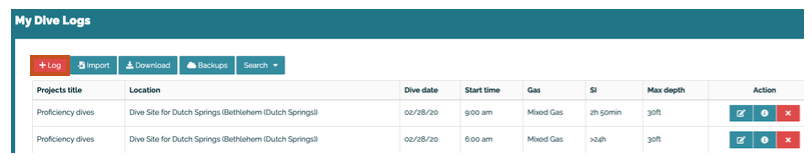
  3. Select “+Log”.
    Bloop system screenshot showing the add log button above the list of my dive logs
  4. Select “+New Log”.
  5. Select the icon under the “Action” column to the right of the appropriate/corresponding dive plan.
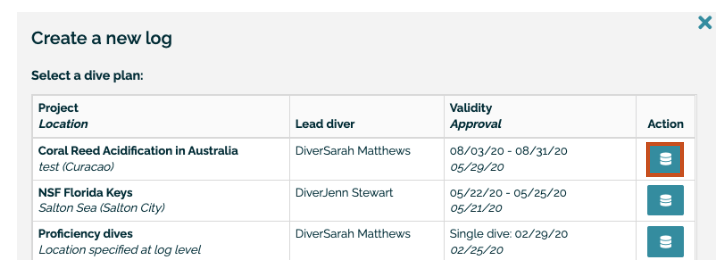
    Screenshot of Bloops system showing the icon in the action column of the dive plan
  6. Select “Continue”.
  7. Populate all fields and tabs (Mandatory fields, Additional info, Notes).
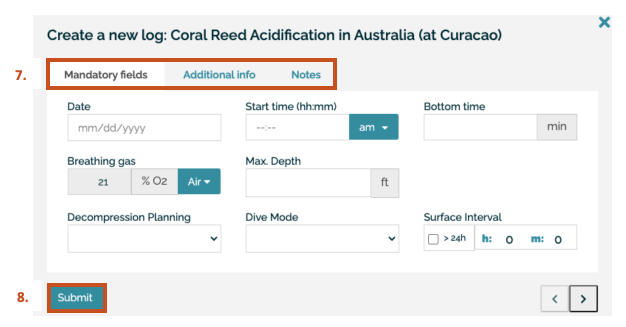
    Screenshot of Bloop system showing fields to complete for the dive log
  8. Submit the log when you are ready to do so.

Office for Research Protections

Address

200 Innovation Blvd.
Suite 110
University Park, PA 16802

The Office for Research Protections (ORP) ensures that research at the University is conducted in accordance with federal, state, and local regulations and guidelines that protect human participants, animals, students, and personnel involved with research.

Contact

Phone: (814) 865-1775

Email: orp@psu.edu