Home » Office for Research Protections » Scientific Diving » Dive Training and Resources » Adding an Area or Location
Scientific Diving Menu
ORP Menu
- Office for Research Protections (ORP) Home Page
- Conflict of Interest
- Controlled Substances
- Drone Operations
- Dual Use Research of Concern (IRE)
- Education
- Export Control-archived
- Human Stem Cells (ESCRO)
- Human Subjects Research (IRB)
- Radioisotopes (UIC)
- Institutional Biosafety Committee (IBC)
- Research Data Management Policy
- Research Integrity
- Research Security
- Scientific Diving
- Vertebrate Animal Care and Use (IACUC)
- Quality Assurance
- ORP Team
- ORP Events
- ORP Announcements
- Office for Research Protections (ORP) Home Page
- Conflict of Interest
- Controlled Substances
- Drone Operations
- Dual Use Research of Concern (IRE)
- Education
- Export Control-archived
- Human Stem Cells (ESCRO)
- Human Subjects Research (IRB)
- Radioisotopes (UIC)
- Institutional Biosafety Committee (IBC)
- Research Data Management Policy
- Research Integrity
- Research Security
- Scientific Diving
- Vertebrate Animal Care and Use (IACUC)
- Quality Assurance
- ORP Team
- ORP Events
- ORP Announcements
Adding an Area or Location
You can add an Area or Location when creating a project or add it before creating a project. An example of an Area may be a particular body of water, such as Lake Erie. Examples of a Location that falls under the Area of Lake Erie may include: Misery Bay and Niagara Boat Launch.
To add an Area or Location before creating a new project, complete the following steps. Also, an area must have a location associated with it before the system will let you submit a dive plan.
- Select “Settings” from the left side menu.
- Expand the select and choose “Locations”.
- Before adding a new location, be sure to review the list of locations already added.
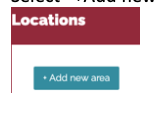
- Select “+Add new area” at the top middle of the page.
- Type in the location you wish to add in the “search map” field.

- Select “Next”.
- Confirm the Country and Region/State fields are accurate and assign the area a name.
- Select “Add Area”.
- To add a Diving Site to a Location, select “Edit area/Map position”
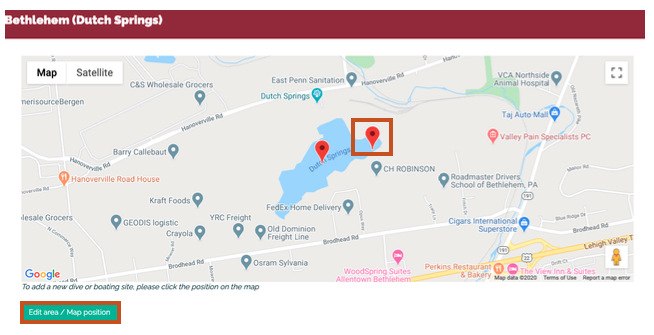
- Drop a pin at the appropriate location.
- Select “Add new location here”.
- Enter a name for the Location and adjust the Lat/Lon coordinates as necessary.
To add a Location to an already existing Area, complete the following steps.
- Select “Settings” from the left side menu.
- Expand the select and choose “Locations”.
- Select the icon under the “Action” column of the Area you wish to add a Location.

- Drop a pin at the appropriate location.
- Select “Add new location here”.
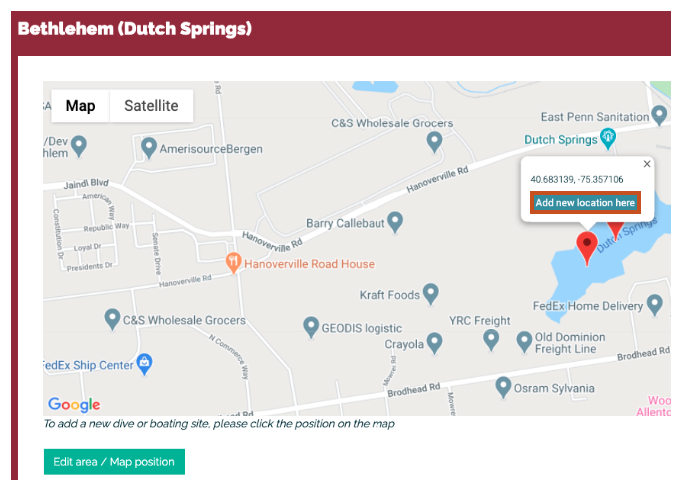
- Enter a name for the Location and adjust the Lat/Lon coordinates as necessary.

Office for Research Protections
Address
200 Innovation Blvd.
Suite 110
University Park, PA 16802
The Office for Research Protections (ORP) ensures that research at the University is conducted in accordance with federal, state, and local regulations and guidelines that protect human participants, animals, students, and personnel involved with research.