Home » Office for Research Protections » Research Security » Find Your Research Security Training Completion Date
Research Security Menu
ORP Menu
- Office for Research Protections (ORP) Home Page
- Conflict of Interest
- Controlled Substances
- Drone Operations
- Dual Use Research of Concern (IRE)
- Education
- Export Control
- Human Stem Cells (ESCRO)
- Human Subjects Research (IRB)
- Radioisotopes (UIC)
- Institutional Biosafety Committee (IBC)
- Research Data Management Policy
- Research Integrity
- Research Security
- Scientific Diving
- Vertebrate Animal Care and Use (IACUC)
- Quality Assurance
- ORP Team
- ORP Events
- ORP Announcements
- Office for Research Protections (ORP) Home Page
- Conflict of Interest
- Controlled Substances
- Drone Operations
- Dual Use Research of Concern (IRE)
- Education
- Export Control
- Human Stem Cells (ESCRO)
- Human Subjects Research (IRB)
- Radioisotopes (UIC)
- Institutional Biosafety Committee (IBC)
- Research Data Management Policy
- Research Integrity
- Research Security
- Scientific Diving
- Vertebrate Animal Care and Use (IACUC)
- Quality Assurance
- ORP Team
- ORP Events
- ORP Announcements
Find Your Research Security Training Completion Date
Note About Annual Refresher Training
If you have already completed the initial one-hour Research Security Training, there is no action required by you at this time. You will be automatically be assigned the 15 minute annual refresher training in the LRN 30 days before your training expires.
IMPORTANT: Please do not re-take the initial one hour Research Security Training course. Completing the initial course again will not change your original completion date and does not count towards your renewal.
Official Record of Training Completion: LRN Transcript
Your LRN Transcript is the official and sole source of truth for your training status. The instructions below will help you check your training status in the LRN and locate your official LRN transcript.
- Navigate to lrn.psu.edu.
- Log in using your Penn State Account email address (e.g., abc123@psu.edu) and password.
NOTE: College of Medicine and Penn State Health users should open an incognito window and then navigate to lrn.psu.edu. For more information, see these instructions: Log In to Penn State Systems.
- Hover over the Learning tab in the main menu (upper left).
- Select View Your Transcript from the drop-down.
- On your transcript page, change the Filter by Status drop-down from Active to All. This displays all the courses you have completed, even those that may have been archived.
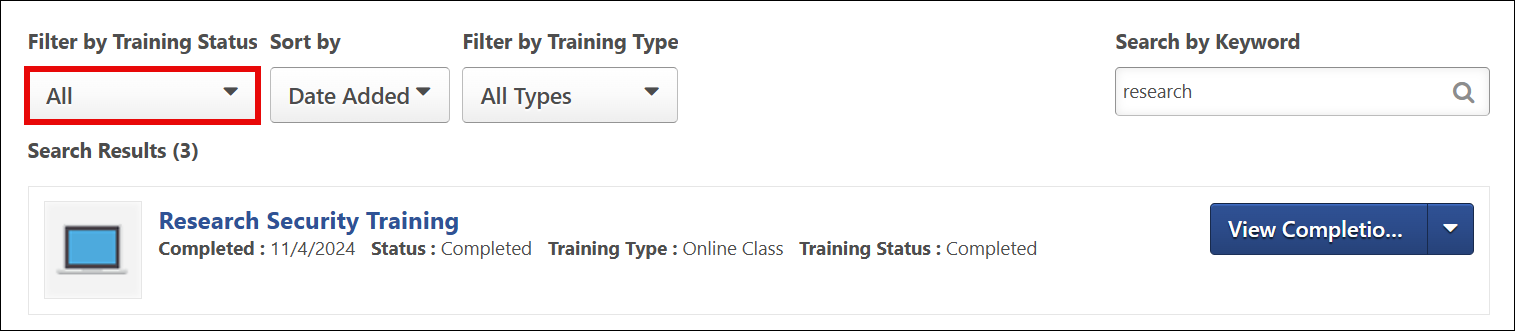
- Locate the Research Security Training in the list.
- Click the arrow on the View Completion Page button and select View Certificate.

Your LRN course completion certificate will display in a new window.
Office for Research Protections
Address
200 Innovation Blvd.
Suite 110
University Park, PA 16802
The Office for Research Protections (ORP) ensures that research at the University is conducted in accordance with federal, state, and local regulations and guidelines that protect human participants, animals, students, and personnel involved with research.