IACUC Menu

ORP Menu

Respond to Clarifications

Create a Research Team

Add a substance

Create a Procedure

Submit a Protocol

Respond to Clarifications

Post-approval Actions

Once a protocol has been created and submitted to the IACUC, the IACUC staff and/or IACUC committee may have additional clarifications or required modifications that need to be made by the research team before a determination can be made. As a result, the research staff may need to respond to questions and/or make changes to their protocol.

When clarifications/required modification requests are made, an email will be sent to the PI, Proxy, and Primary Contact and the submission will also appear in My Inbox within CATS IACUC.

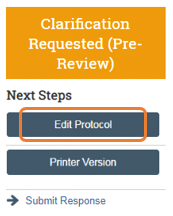
From the submission workspace History Log, click the Clarifications Request… activity entry and read the comments. Click Edit Protocol to view where reviewer notes have been added in the IACUC submission form, as well as to make changes to the submission.

Screenshot of the CATS IACUC system showing where you can click edit protocol in the next steps menu

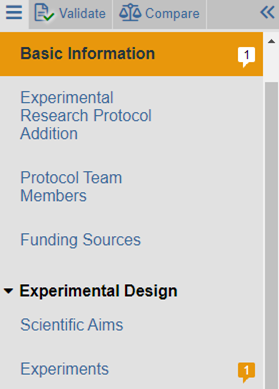
The left navigation bar will identify smartform pages where reviewer notes have been added. Reviewer notes are identifiable by the reviewer note icon ().

Screenshot of the left navigation bar where smartform pages are listed and the reviewer note icon appears next to pages where notes have been added

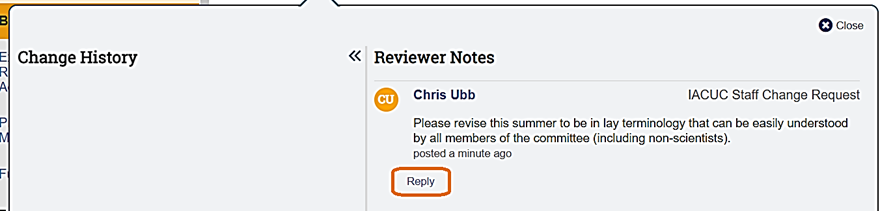
In the example above, one reviewer note was added on the Basic Information page and one reviewer note was added on the Experiments page. To read the specific reviewer note, first navigate to the page on which the reviewer note was added. Once on the page, click on each reviewer note icon (They can appear at the top right of the page (if applicable to the entire page) or to the right of any question. If applicable, reply to the reviewer note by clicking Reply.

Screenshot of a sample reviewer note in the CATS IACUC system

Upon clicking Reply, you will be provided with the opportunity to add text and/or attach files (if applicable). After adding any desired text and files, click OK to save the note and then Close on the Reviewer Note window.

Screenshot of the reply window to review notes in the CATS IACUC system

Once all reviewer notes have been addressed and the appropriate changes have been made to the submission form, click Save and then Exit at the bottom right.

screenshot of save and exit buttons to click

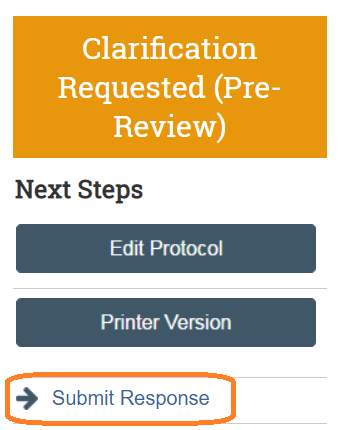
The Principal Investigator or, if assigned, a PI Proxy may now click execute the Submit Response activity in the when ready to submit back to the IACUC.

screenshot showing the submit response option in the next steps menu

Office for Research Protections

Address

200 Innovation Blvd.
Suite 110
University Park, PA 16802

The Office for Research Protections (ORP) ensures that research at the University is conducted in accordance with federal, state, and local regulations and guidelines that protect human participants, animals, students, and personnel involved with research.

Contact

Phone: (814) 865-1775

Email: orp@psu.edu